The top 3 non-merchant shopping apps for June 2012 are: RedLaser, Out of Milk Shopping List, and SavingStar Grocery eCoupons. Nielsen, a company that provides clients the most complete understanding of what consumers watch and buy, has just released " Top 10 Shopping Apps for June 2012 (Smartphones, U.S.)" Among the top 10 shopping apps, 7 apps are either merchant-specific, marketplace, or group buying apps like Group and LivingSocial. What's interesting to know is the 4 apps that have nothing to do with any specific online store or marketplace. These are the 4 most popular needs met by smartphone apps that helps online consumers the most in June 2012: 1. Have incentives to walk into stores Shopkick is the a mobile app that gives you rewards and offers simply for walking into stores. Though it doesn't cover all stores that you'll find in your area, it does cover good percentage of major stores. For example, on August 24, Shopkick offers a promotion of 200-kick walk-ins at Target, Macy's, Toys"R"Us, Old Navy. 2. Find where the best deals are (locally and online)
RedLaser let you scan can Barcode or QR code to search for items to make sure you have all the information you need, including product details, ratings and price comparison. Whenever you're in a store, simply pull out your smartphone, scan the code, and you'll get a sense of whether you may get a better price elsewhere on most big ticket items. 3. Plan your shopping list Out of Milk is one of the most feature-rich and intuitive Shopping List, To-Do List and Pantry List apps available for your phone. Watch this video to learn how it can help you manage your shopping list: 4. Use Coupons at Supermarkets SavingStar Grocery eCoupons is an app that offers digital grocery coupons redeemable at over 24,000 supermarkets and drugstores nationwide from brands you love.
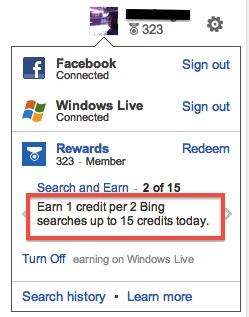
Some of you may be familiar with Bing rewards. According to Bing.com: Use Bing. Get Rewarded. Join Bing Rewards to start earning credits toward free rewards.Once you sign on Windows Live account, you're entitled to earn 1 credit per 2 Bing searches up to 15 credits per day. Once you accumulate 525 credits, you'll be able to redeem a $5 Amazon gift card. Put the earned credits into perspective, if you're the type of person who performs a lot of searches on Bing.com every day, and you like to use Bing anyway, you'll probably earn one $5 Amazon card every couple months. Similarly, the I Need a Bargain Rewards that we quietly launched this week rewards your visits to INeedaBargain.com. Every day you visit our site, you'll instantly be rewarded with 100 pts. Your rewarding balance is always shown at the bottom of the page on INeedaBargain.com. There are actually more ways to earn INAB reward points: When you visit our pages enabled with INAB Rewards, not only you'll get 100 points every 24 hours. In addition, when you Tweet, Plus One for Google, or Like us for Facebook by clicking the corresponding icon, you'll get another 100 pts for each action you take. Even more, when you're on a deal page where you can always find the comment form powered by Facebook, you make a comment and you'll get another 100 pts. I personally think it's the best rewarding mechanism for your willingness to share your opinion. In summary, the following actions are rewards-enabled: - Visit
- Like
- Tweet
- +1
- Comment
Our catalog of redemption includes eGift card from Restaurant.com, Groupon, Barnes & Noble, and Starbucks. Just to add some fun to the INAB Rewards, we also offer many badges to reward your visits and sharing with your friends. To start having fun with us, all you need is simply connect your Facebook account and you're in. As soon as you accumulate enough points to redeem things on the Catalog, you can go ahead and redeem conveniently online and be notified by e-mail with steps to get your prize:
Computers may have revolutionised the way we shop, but smartphones are taking the changes even further. When it comes to buying goods there really is no end to their talents. These five apps are all designed to help you save money, whether you’re shopping online or out on the high-street.
1. Google Shopper (Android and iPhone)
Goggle Shopper is a great place to start. It allows you to check the price of an item in a variety of different ways. You can scan the barcode or use the camera on your phone to take a picture of the product. You can even search by saying the name of the product if you’re using a device with voice command enabled. Once the app knows what you’re looking for it will return with the best prices from the web. The app can even be used to locate your nearest local stores, which could help you save money on petrol. 2. RedLaser (Android, iPhone & Windows Phone)
RedLaser is a price comparison app powered by eBay. Just like Google Shopper you can search by barcode, image or voice. The app will then return the prices for thousands of retailers presenting a mixture of online and offline results in an easy to use format. RedLaser will even return prices for the local stores it lists which is as useful as it is impressive. It really is the perfect app for bargain hunters. 3. Groupon App (iPhone, Android, Blackberry, Windows Phone)
Groupon is the daddy of all deals websites and now you can make the same savings by shopping with your phone. You can keep track of all the new deals from anywhere and redeem the offers straight from your phone. Just like Facebook Deals, Groupon uses your location to bring you the nearest deals. Let’s just hope there’s an offer on whatever you’re looking for. 4. XE Currency App (Android, iPhone, Blackberry, Windows Phone)
This one’s a bit different, but the XE Currency App is an essential bit of kit for any frequent traveller who wants to save money. It lists the live exchange rates for every currency in the world and updates every single minute. You can even find out the going rate for different precious metals which is pretty cool. The currency converter is particularly useful for shopping abroad as it will tell you how much the item you’re looking at would cost at home. You can even use one of the 30,000 currency charts to work out whether the current exchange rate is good or bad. --- About The Author
When not shopping online, Vince Polley sources personalised gifts for Find Me A Gift Ltd, the UK online gift store.
The advancement in mobile technology has made the lives of many professionals a lot easier including the designers. The mobiles devices have become critical to them and play a role which is as important as a computer. The mobile technology is evolving rapidly by which designers are able to accomplish their tasks while they are on the move. The designers are able to spend more time on creativity and do not have to waste valuable time in thinking about the unfinished work in the studio. 1. Adobe Photoshop Express
The Adobe Photoshop program is a favorite among designers over the years and the good news is that it is now available on mobile phone for instant photo editing. The mobile version is available on IOS, BlackBerry and Android as an express program but offers immense opportunities for photo editing. This is definitely not a replacement for the PC version of the software but the phone version does offer a great alternative. 2. Sketchbook Mobile
Many magazines have opined that is a "Must Have" app for your iPad. This is an amazing application from Autodesk and it has the capacity to transform your mobile device into a sketchbook. The intuitive interface, the rich toolset and professional sketching capabilities are some of the plus points of this wonderful application. You can just run your fingers and create anything from a rough sketch to a detailed artwork. There is an option to save the file in any format or import it directly to Photoshop. The application is available on iPhone, iPad, iPad Touch and Android. 3. WordPress Mobile
The WordPress is a favorite tool among web designers and bloggers for many years. It is regarded by experts as an easy tool to create web pages and for editing them. But now the same functions are available on Apple, BlackBerry and Android phones. The application is very easy to use and it allows redesign, creation and editing of the pages. This application is highly useful for those persons who updates their blogs very regularly or who is covering a particular situation or an event. If you are familiar with the computer based version, then this portable app will be easy for you. 4. Palettes
It is a powerful iOS app for iPad and iPhone which lets the user to create palettes on the move. There is also a palette library wherein you can store pre-made models or webpage. You just need tap a color in the palette to get all the possible details like Web Hex values, Gray percentage and CMYK. There is also a pro version available which has good editing programs like Adobe Suite. 5. Photogene
This app is available on iPhone and has been very popular with the designers since it’s' launch in 2008. If you are accustomed with the Mac interface then this photo editing app will be a piece of cake for you. You can indulge in quick and easy photo editing with simple tools like cropping and resizing or get into more serious matter like full redesigning of photographs. You can get add-ons by paying extra but they are totally unnecessary. Indeed the advent of smartphones and tablets has made life easier for the designers. But at the same time so many designing applications can really confuse a person. So we suggest that you choose those applications which are suitable for you. But since all the above-mentioned apps are free, you can take the easy way out - download all of them. --- About the author: Kelly is a blogger by profession. She loves writing on technology and luxury. Beside this she is fond of gadgets. Recently an article on cellphone beat attracted her attention. These days she is busy in writing an article on gizmo watch.
As more and more software moves to the cloud there are still software images that requires installation on your personal computer. For those kind of software titles, Giveawayoftheday.com is a website that nominates one software title a day to be a Giveaway title of that day. Totally free to you! Every day, one software title is available for download for 24 hours (or more, if agreed with software publisher) and that software is absolutely free. Such a free software title is not a strip down trial version, nor is limited in functions in any way, but a registered, licensed and legal version of the software is completely free for users to keep and use, which sounds too good to be true. Take today as an example, the following software title is the free giveaway of today that we dynamically pulled from Giveawayoftheday.com. Check this out: What if you missed the free offer? Well, as far as we know, once the giveaway for a software product is over, they will continue to promote the software title with discounted purchase links or coupon so you can get some discount off the title. You can sure take your time to read through software reviews after the giveaway day for the given software product. It's a win-win situation for both software users and software publishers to promote their software. For other discounted software offers, please see INAB software deals. --- by Charles Gwa
Ever wonder if there's a way to save on prescription medicines? We at INeedaBargain.com ( INAB) has partnered with a non-profit advocacy group, NeedyMeds.org, to offer consumers an easy, free way - discount drug card - to save money on many prescription medications, over-the-counter medicines and medical supplies if written on a prescription blank, and pet prescription. You can use the discount drug card regardless of your income or whether or not you have insurance. To use the card, there is no application fee or registration process, and you do not need to provide a medical history, social security number or other private information in order to receive the benefits. A few highlights about the card: - Free, no fees or registration
- Use at over 62,000 pharmacies nationwide including all major chains
- Share the care with friends andfamily
- Use the card as often as needed
- Never expires
The pharmacies in your neighborhood is pretty much covered. You can do a pharmacy search by entering your zip code below and click on 'search': Have a prescription to fill? You may click here to learn more about the card and download your discount drug card. If this all sounds too good to be true, see what the founder of NeedyMeds.org has to say about the program. I hope to hear back from you about your experiences using the cards so I can share your stories. Please comment on this post if you found the card useful or not.
Higher education should not be a privilege only to those who can afford to pay. Who can't use some free courses? These free courses are not some basic courses at the elementary or middle school level. They are high quality courses from the top universities, for free. Yes, you read me right, FREE! Founded in 2011 by two Standford professors - Andrew Ng and Daphne Koller - Coursera.org is based in Mountain View California. Coursera.org hosts professor-created courses and lectures from many top universities include Princeton University, Stanford University, University of California, Berkeley, University of Michigan-Ann Arbor, and University of Pennsylvania. A couple of years from now these free high quality university-level courses may become a norm, but right now, Coursera.org is changing the face of education so you can learn at your own pace and work on your own schedule over the Internet. Here's a partial list of courses currently available through Coursera in 6 major categories: The course offerings by Coursera span a broad range of more advanced topics than those offered by Khan Academy (also a great online free education source), and the number of courses offered are growing too. If you can't find the course you'd like to take, you can sign up to be notified when there are more offerings. While I direct my kids to try out Khan Academy, I'm all in for trying out some courses on Coursera. --- by Charles Gwa
Chomp and App Deals are two great apps for discovering free phone apps. Both are free, of course. Today, the news that Apple has acquired Chomp has been released. The acquisition is said to be around $50 million. What is Chomp? Chomp is an app that let you discover apps for both iOS and Android platform. It finds you apps that you've never known of. The nice thing about Chomp is it presents apps' screenshots on your phone with almost full screen images so the browsing experience is better. On an iPhone, Chomp's home screen shows you a "Free Apps of the Day" section. App Deals is also good. App Deals is just one of a series of apps - Appsfire, Apps Deals, Appstream, Apps for Kids - by Appsfire to let you discover and share iPhone and Android apps. I used App Deals before I discovered Chomp. App Deals's home screen emphasizes on the best of now free apps and price drops, and its push notification comes once a day to alert me their new free findings. Also, App Deals was the Winner of the "148apps - 2011 Best App Ever" Award for Best App Bargain. Chomp is expected to work its way into iTune over time as the result of acquisition, while App Deals by Appsfire remains independent. If you're looking for other iPhone bargains, please visit our iPhone deal section. --- by Charles Gwa Chomp | App Deals |
|